36 Apartment Social Media Post Ideas, Sorted by Goal

Contents
The best apartment social media mixes eight kinds of posts: the homes, the amenities, community life, the people, the neighborhood, reviews, offers and helpful tips. Below are 36 specific post types across those eight groups. Each one comes with what it shows, where it works best, and what you need to make it.
We built this list as the content plan behind our own product, so it's organized the way a month of posts actually gets planned: by goal first, then format.
What should an apartment community post on social media?
Post what a renter needs to decide, spread across all eight groups so one kind of post never dominates. A feed that is all specials reads like an ad. A feed that is all pool photos never shows the home someone would actually rent.
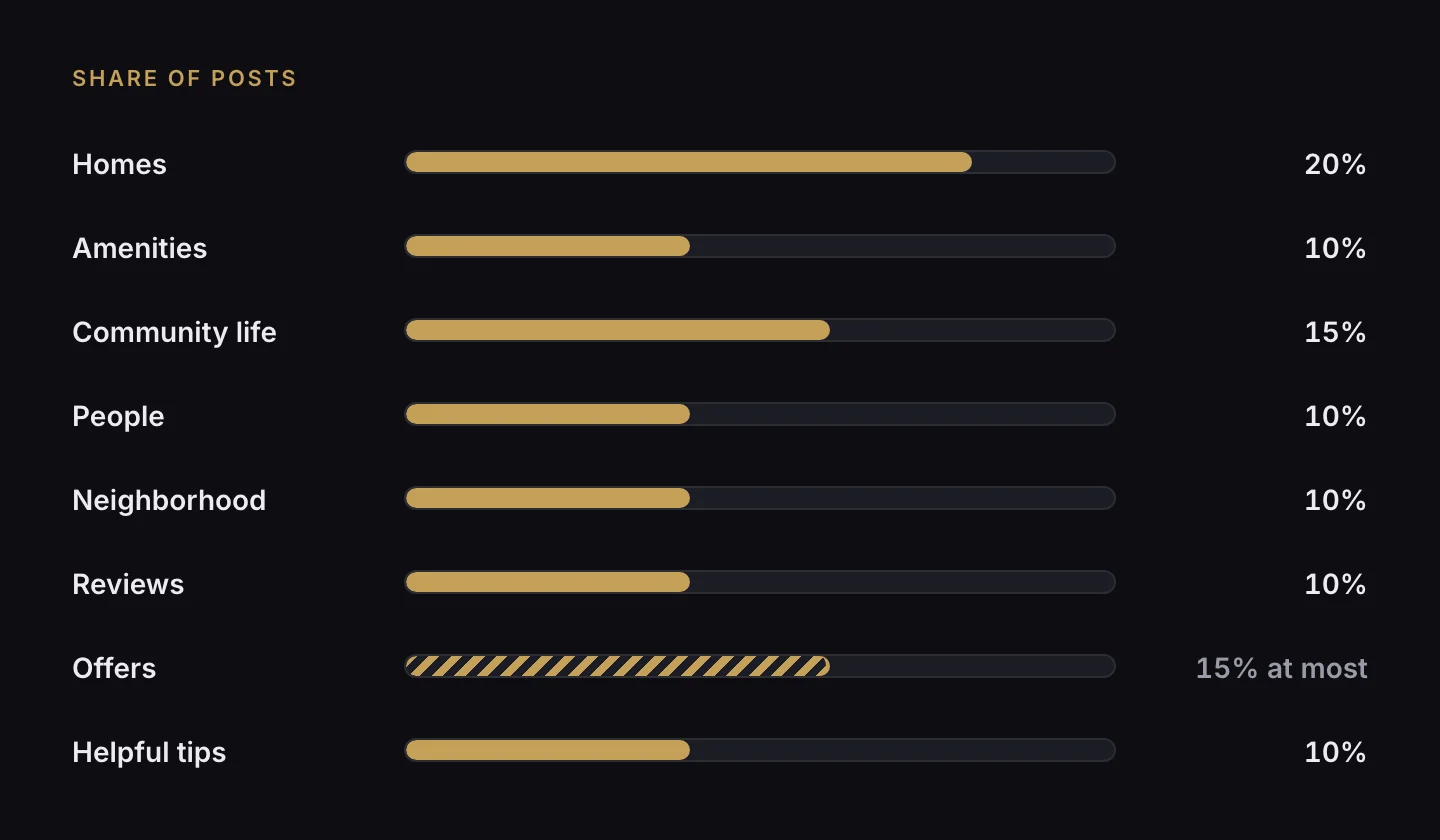
Here's the starting mix we use for a stable community in a normal month. It's a reasoned default, not a measured industry benchmark (no public per-type benchmark for apartments exists that we could find), so adjust it to your own results:
| Group | Share of posts | What it's for |
|---|---|---|
| Homes | 20% | The product being rented |
| Amenities | 10% | What renters compare communities on |
| Community life | 15% | Reach, and a reason to follow |
| People | 10% | Trust: real faces behind the leasing office |
| Neighborhood | 10% | The thing most communities under-post |
| Reviews | 10% | Proof from people who live there |
| Offers | 15% at most | Specials and availability, kept to a ceiling |
| Helpful tips | 10% | Answers renters search for |
Homes: what posts show off the apartments themselves?
These sell the thing you're renting. During a lease-up they deserve more than their 20%.
| # | Post type | What it shows | Best on | You'll need |
|---|---|---|---|---|
| 1 | Unit walkthrough video | Front door → living → kitchen → bedroom → bath → balcony, a few seconds each | Reels, Shorts | A unit video or a full photo set |
| 2 | Floor plan spotlight | One plan: name, layout, price, move-in date on the first frame | Reels, Google, ads | Plan name, rent, availability |
| 3 | Micro-tour from photos | 4–6 stills cut fast to music | Shorts, TikTok | Four or more good photos |
| 4 | Renovation before/after | A wipe from the old finish to the new one | Reels, TikTok | Matching before and after photos |
| 5 | Hero photo | One clean, well-lit room, no text on it | Feed, Pinterest | One great photo |
| 6 | Floor plan graphic | The plan drawing with name and square footage | Instagram, Pinterest, Google | The plan image |
| 7 | Before/after pair | A two-card carousel, before first | Instagram, Facebook | Paired photos |
⚠️ If a photo is virtually staged or AI-edited beyond color and exposure, label it. Never present it as the home a renter will get.
Amenities: how do you post amenities without repeating the pool?
Post one amenity at a time, in use, and rotate through the full list before repeating any. The rotation is what stops the pool appearing every other week.
| # | Post type | What it shows | Best on | You'll need |
|---|---|---|---|---|
| 8 | Single amenity | The amenity in use, never an empty room | Everywhere | Your amenity list and photos |
| 9 | "5 things included" | Five quick beats, a big "5" on the first frame | Reels, TikTok | Five or more amenities |
| 10 | Amenity carousel | 4–6 cards, strongest amenity first | Instagram, Facebook | Photos of each |
Community life: what posts build a following?
These are the posts people follow an account for, and they earn reach for everything else.
| # | Post type | What it shows | Best on | You'll need |
|---|---|---|---|---|
| 11 | Day-in-the-life | First-person morning → amenity → neighborhood → home | TikTok, Reels | A consenting resident or staff member |
| 12 | Event recap video | The loudest second of the event first, then fast cuts | Instagram, Facebook, Google | Event clips, with permission |
| 13 | Pet feature | The pet, moving, in the first frame | TikTok, Instagram | Owner-submitted clip, with permission |
| 14 | Seasonal video | Weather or decor before any words | Everywhere | Seasonal footage |
| 15 | Trend format | A current audio trend, done your way | TikTok, Reels | The platform's own audio library |
| 16 | Lifestyle photo | Someone using the space | Instagram, Pinterest | A consented photo |
| 17 | This-or-that poll | Two options, no explanation needed | Stories | Two photos |
| 18 | Event invite | Date and event name, big | Facebook, Instagram, Google | Event details |
| 19 | Event photo set | The busiest frame first, 4–10 cards | Facebook, Instagram | Event photos |
| 20 | Seasonal graphic | A clear seasonal signal | Everywhere | — |
| 21 | Pet spotlight photo | The pet, square crop | Instagram, Facebook | Owner permission |
For trend formats, use the audio from inside each app's own library when you post, not a downloaded track.
People: should apartment communities post their staff?
Yes, with permission. Faces build trust faster than any amenity photo, and team posts are the cheapest content you have.
| # | Post type | What it shows | Best on | You'll need |
|---|---|---|---|---|
| 22 | Meet the team video | Name and role on screen from the first second | Facebook, Instagram, Google | Staff consent |
| 23 | A day at the leasing office or with maintenance | Time-stamped moments through a shift | TikTok, Reels | Staff consent |
| 24 | Move-in day | Keys → threshold → "welcome home" card | Instagram, Facebook | Resident consent; keep unit numbers off camera |
| 25 | Team photo | Face, name, role | Facebook, Google | Staff consent |
Neighborhood: what local posts work for apartments?
Name real places and real distances. "Close to everything" says nothing, while "6 minutes to the Green Line" answers a question renters actually have.
| # | Post type | What it shows | Best on | You'll need |
|---|---|---|---|---|
| 26 | Neighborhood spotlight | A named local spot, then its walk time from your door | TikTok, Reels, Pinterest | Your list of nearby places |
| 27 | Commute timer | A drive or walk with a running clock | Reels, Shorts | Address and destination |
| 28 | Neighborhood guide carousel | "5 places within 5 minutes," one per card | Instagram, Pinterest | Places plus distances |
Reviews: how do you turn reviews into posts?
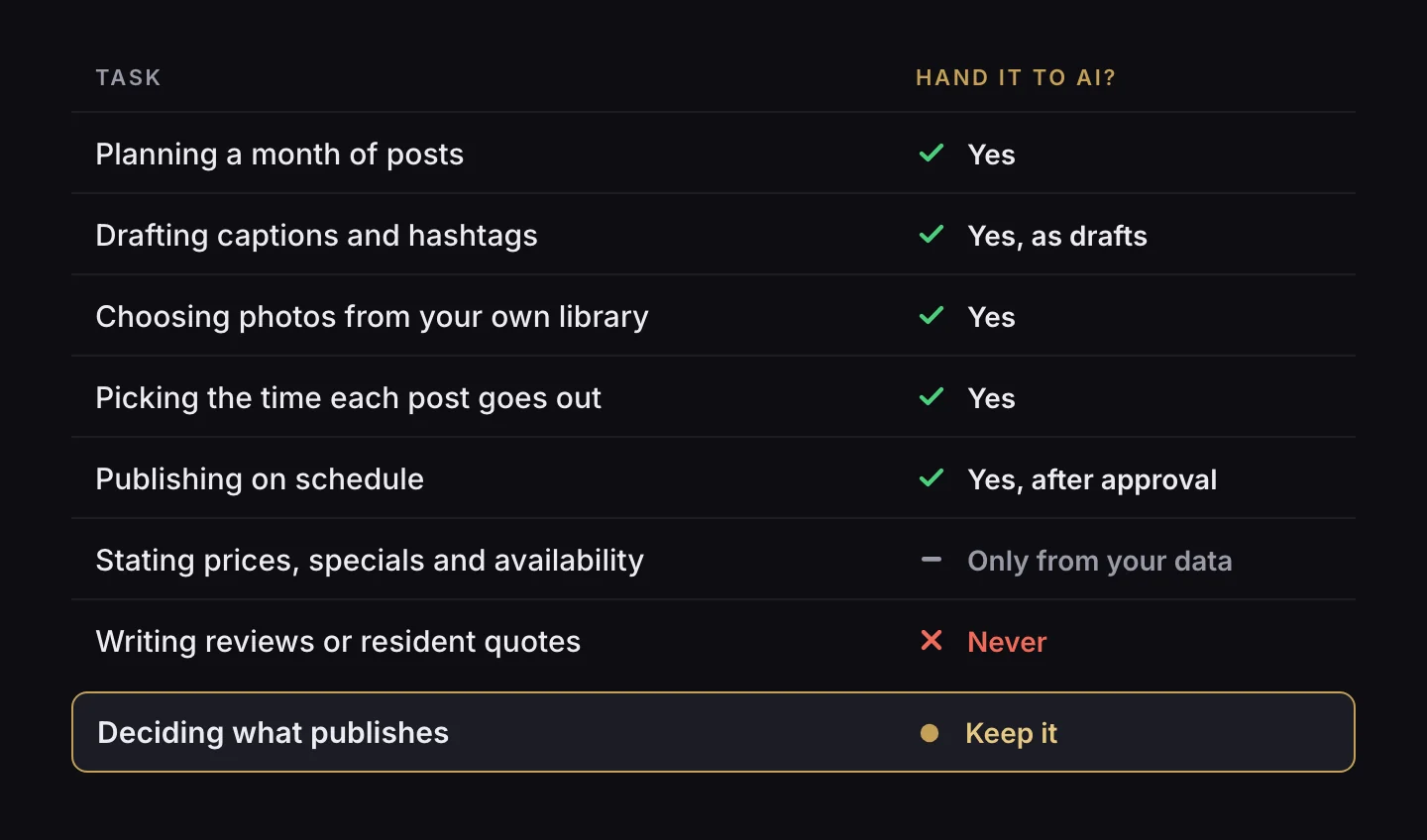
Use real reviews, attributed honestly, with permission where the reviewer is identifiable. The FTC's rule on consumer reviews, 16 CFR §465.2, prohibits reviews or testimonials that misrepresent that the reviewer exists, that they had real experience with the business, or what that experience was. So never write a "resident quote" yourself.
| # | Post type | What it shows | Best on | You'll need |
|---|---|---|---|---|
| 29 | Resident testimonial video | Their strongest sentence first, under 30 seconds | Facebook, Instagram, ads | A consenting resident, in their own words |
| 30 | Review motion card | Stars draw in, then the quote | Everywhere | A real public review |
| 31 | Review quote card | Stars and a short quote, square | Everywhere | A real public review |
Offers: how often should apartments post specials?
Keep offers to a ceiling, around 15% of posts in a normal month, and only post an offer that actually exists. "Only 3 left!" is fine when three are left. Invented urgency is how a community loses trust, and it can mislead.
| # | Post type | What it shows | Best on | You'll need |
|---|---|---|---|---|
| 32 | Availability countdown | The real number first: "3 two-bedrooms left for November" | Shorts, Reels, ads | Live availability |
| 33 | Availability card | Homes available, with plan and price | Instagram, Facebook, Google | Live availability |
| 34 | Special or concession | The offer in six words or fewer | Everywhere, ads | A real, current special |
When there's no real offer this month, swap the offer slots for reviews or community life rather than inventing one.
Helpful tips: what educational posts do renters want?
These answer the questions renters already search for, which makes them the posts most likely to be found later.
| # | Post type | What it shows | Best on | You'll need |
|---|---|---|---|---|
| 35 | One-question video | A real prospect question, answered in under 30 seconds | TikTok, Shorts | Your most-asked questions |
| 36 | Tips carousel | A numbered promise on card one ("4 things to bring to your tour") | Instagram, Pinterest | — |
How do you keep apartment posts from all looking the same?
Variety comes from rules, not inspiration. These are the ones we schedule by:
- No two posts in a row of the same type.
- No three posts in a row from the same group.
- Every group appears at least once a month.
- Rotate through every amenity, floor plan and nearby place before repeating one.
- Don't reuse a photo or clip within about six weeks, or the same opening hook within two.
- Make each post for its platform, rather than re-uploading one platform's export to another.
Which platform rules trip up apartment posts?
Each platform has one or two rules that quietly break a good post. These are the ones we design around, quoted from each platform's own documentation:
| Platform | The rule | What to do |
|---|---|---|
| TikTok (posting through an app) | Apps and integrations "should not superimpose or otherwise include any brand name, logo, watermark, other promotional branding, link or promotional text" on content shared to TikTok, and preset text and hashtags "should be allowed to be edited by the user before posting" (TikTok for Developers) | Keep app-added branding off TikTok videos; let the person edit the caption before it posts |
| Facebook and Instagram Reels ads | Leave "roughly 14% of the top, 35% of the bottom, and 6% on each side" free of text, logos or key elements (Meta ads guide) | Put your logo and closing card in the middle band, not at the bottom |
| Pinterest ads | "Your logo or brand name should be clearly visible on every ad," without overtaking it; 2:3 (1000 × 1500) is recommended (Pinterest Business) | Pinterest is the one place your logo belongs on the image |
| Google Business Profile | Posts with a phone number in the description "might get rejected if they cannot be verified as being connected to the business" (Google) | Use the post's call button instead of typing the number |
| YouTube Shorts | Shorts can be "up to 3 minutes long" (YouTube Help) | Most apartment Shorts work far shorter; put the hook in the first seconds |
Which post ideas carry fair-housing risk?
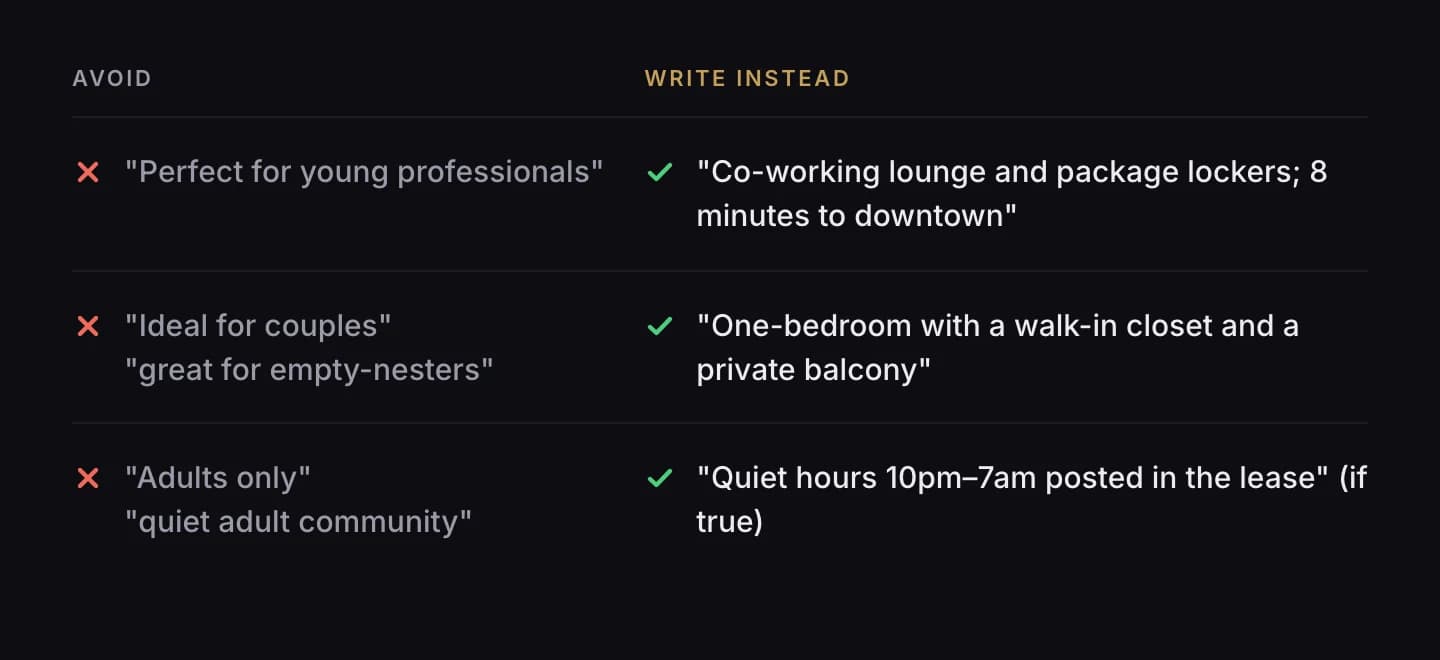
Any post that shows or describes people. Under 24 CFR §100.75, photos and illustrations count as much as words. Keep these in mind:
- Describe the place, not the person. "Rooftop deck with grills," not "perfect for young professionals."
- Vary who appears across the month, not just within one post, so the feed as a whole doesn't signal who is welcome.
- Add the Equal Housing Opportunity logo or slogan to ads and video closing cards.
- Get written permission from every resident and staff member you feature, and for pets, from their owners.
Our full guide to fair housing rules for apartment ads and social posts covers wording, photos and ad targeting in detail.
Should a lease-up post differently from a stable community?
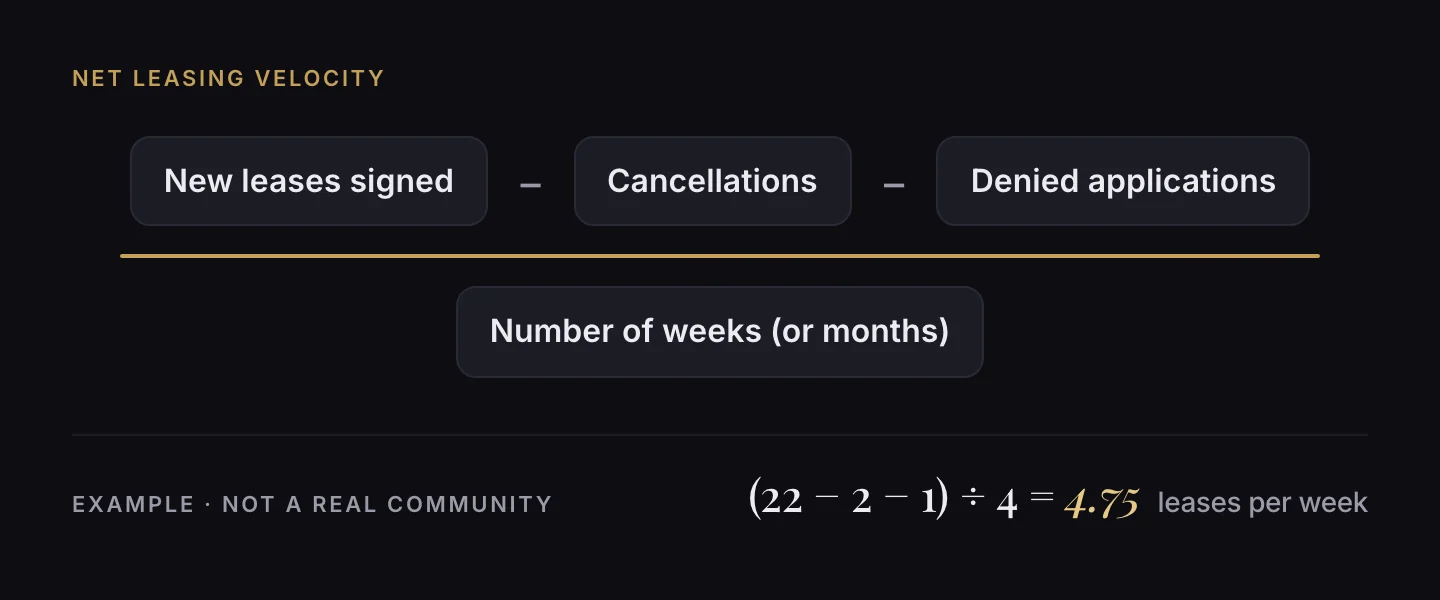
Yes. Shift the mix toward what fills homes fastest. In a lease-up, lean on homes, the neighborhood and real availability (types 1–7, 26–28 and 32–34). Once a community is stable, lean on community life, people and reviews to keep residents and reputation strong. Whichever stage you're in, measure the effect with leasing velocity, not likes.
Where Lease Velocity fits
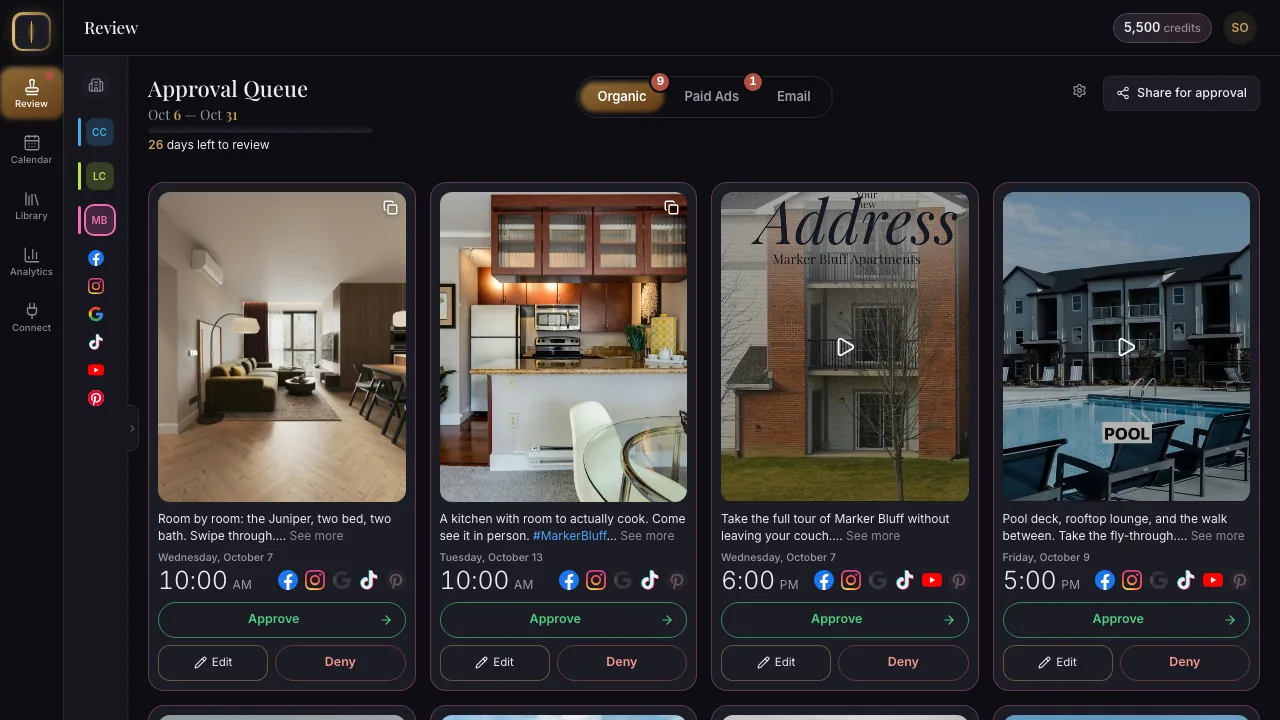
Lease Velocity is AI marketing for apartment communities, built around this list. It reads your property and writes, schedules and publishes a month of social posts, lead ads and email, after you approve them. Lease Velocity plans and schedules posts for Facebook, Instagram, Google Business Profile, TikTok, YouTube and Pinterest, and sends email. A generated post is a draft until you approve it, and only an approved post with a time on it ever publishes.
Sources (fetched 2026-10-07)
- TikTok for Developers, "Content Sharing Guidelines".
- Meta, Facebook Reels ad specifications.
- Pinterest Business, "Creative best practices".
- Google Business Profile Help, "Create & manage posts on your Business Profile".
- YouTube Help, Shorts.
- 16 CFR §465.2, fake or false consumer reviews (Legal Information Institute, Cornell).
- 24 CFR §100.75, discriminatory advertisements (Legal Information Institute, Cornell).
Related
Lease Velocity